A colapsable container widget with (optional) title.
Here is a simple example that shows how to create a GroupBox with some content inside:
from qarbon.external.qt import QtGui
from qarbon.qt.gui.application import Application
from qarbon.qt.gui.icon import Icon
from qarbon.qt.gui.groupbox import GroupBox

app = Application()
panel = QtGui.QWidget()
layout = QtGui.QVBoxLayout()
panel.setLayout(layout)
gb = GroupBox()
layout.addWidget(gb)

gb.title = "Configuration"
gb.icon = Icon("applications-accessories")

content = QtGui.QWidget()
gb.setContent(content)
contentLayout = QtGui.QHBoxLayout()
content.setLayout(contentLayout)
label = QtGui.QLabel("File:")
edit = QtGui.QLineEdit()
button = QtGui.QPushButton(Icon("folder-open"), "Open a file...")
contentLayout.addWidget(label)
contentLayout.addWidget(edit)
contentLayout.addWidget(button)

panel.show()
app.exec_()
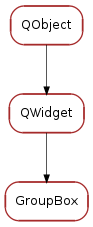
Classes
| GroupBox | An expandable/collapsible container widget |
Bases: PyQt4.QtGui.QWidget
An expandable/collapsible container widget
Returns the contents widget
| Returns: | the current content widget or None if no content is set |
|---|---|
| Return type: | QWidget |
Sets the content widget
| Parameters: | qwidget (QWidget) – the content widget or None |
|---|
Returns the title button widget
| Returns: | the title button widget |
|---|---|
| Return type: | QToolButton |
Returns the collapse button widget
| Returns: | the collapse button widget |
|---|---|
| Return type: | QToolButton |
Sets this widget’s title
:param title:the new widget title :type title: str
Sets this widget’s title icon
| Parameters: | icon – (Qt.QIcon) the new widget title icon |
|---|
Returns this widget’s title icon
| Returns: | this widget’s title icon |
|---|---|
| Return type: | QIcon |
Returns this widget’s contents visibility
| Returns: | this widget’s contents visibility |
|---|---|
| Return type: | bool |
Sets this widget’s contents visibility
| Parameters: | show (bool) – the new widget contents visibility |
|---|
Returns this widget’s title visibility
| Returns: | this widget’s title visibility |
|---|---|
| Return type: | bool |
Sets this widget’s title visibility
| Parameters: | show (bool) – the new widget title visibility |
|---|
Returns this widget’s title height
| Returns: | this widget’s title height |
|---|---|
| Return type: | int |
Sets this widget’s title height
| Parameters: | height (int) – the new widget title height |
|---|
Sets this widget’s title style Used key/values for style_map:
- ‘title_start_color’ : brush (Ex.: ‘#E0E0E0’)
- ‘title_stop_color’ : brush (Ex.: ‘#E0E0E0’)
- ‘title_font_color’ : brush (Ex.: ‘#E0E0E0’)
- ‘title_border_radius’: radius (Ex.: ‘5px’)
- ‘content_start_color’ : brush (Ex.: ‘#E0E0E0’)
- ‘content_stop_color’ : brush (Ex.: ‘#E0E0E0’)
- ‘content_border_radius’: radius (Ex.: ‘5px’)
| Parameters: | style_map (dict) – the new widget title style |
|---|
This property contains the widget’s title
Access functions:
This property contains the widget’s title icon
Access functions:
This property contains the widget’s title height
Access functions:
This property contains the widget’s title visibility
Access functions:
This property contains the widget’s style map
Access functions:
This property contains the widget’s content’s visibility
Access functions: