A widget that displays an image (pixmap).
You can adjust properties like the aligment inside the widget space, aspect ratio and transformation mode (quality).
Example:
from qarbon.external.qt import QtGui
from qarbon.qt.gui.application import Application
from qarbon.qt.gui.icon import Pixmap
from qarbon.qt.gui.pixmapwidget import PixmapWidget

app = Application()
panel = QtGui.QWidget()
layout = QtGui.QGridLayout()
panel.setLayout(layout)
img = PixmapWidget()
layout.addWidget(img)

img.setPixmap(Pixmap(":/led/led_red_on.png"))
img.show()
app.exec_()
Classes
| PixmapWidget | This widget displays an image (pixmap). |
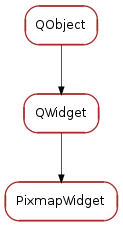
Bases: PyQt4.QtGui.QWidget
This widget displays an image (pixmap). By default the pixmap is scaled to the widget size and the aspect ratio is kept. The default alignment of the pixmap inside the widget space is horizontal left, vertical center.
Signal emited when pixmap source changes
Returns the pixmap.Returns None if no pixmap is set.
| Returns: | the current pixmap |
|---|---|
| Return type: | QtGui.QPixmap |
Sets the pixmap for this widget. Setting it to None disables pixmap
| Parameters: | pixmap (QtGui.QPixmap) – the new pixmap |
|---|
Returns the aspect ratio to apply when drawing the pixmap.
| Returns: | the current aspect ratio |
|---|---|
| Return type: | QtCore.Qt.AspectRatioMode |
Sets the aspect ratio mode to apply when drawing the pixmap.
| Parameters: | pixmap (QtCore.Qt.AspectRatioMode) – the new aspect ratio mode |
|---|
Returns the transformation mode to apply when drawing the pixmap.
| Returns: | the current transformation mode |
|---|---|
| Return type: | QtCore.Qt.TransformationMode |
Sets the transformation mode to apply when drawing the pixmap.
| Parameters: | pixmap (QtCore.Qt.TransformationMode) – the new transformation mode |
|---|
Returns the alignment to apply when drawing the pixmap.
| Returns: | the current alignment |
|---|---|
| Return type: | QtCore.Qt.Alignment |
Sets the alignment to apply when drawing the pixmap.
| Parameters: | pixmap (QtCore.Qt.Alignment) – the new alignment |
|---|
Resets the transformation mode to QtCore.Qt.AlignLeft | QtCore.Qt.AlignVCenter
This property holds the widget’s pixmap
Access functions:
This property holds the widget’s pixmap aspect ratio mode
Access functions:
This property holds the widget’s pixmap transformation mode
Access functions:
This property holds the widget’s pixmap alignment
Access functions: