Previous topic

qarbon.qt.gui.application

Next topic

qarbon.qt.gui.basemodel

This Page

qarbon.qt.gui.axeswidget

Multiple axis (axes) widget.
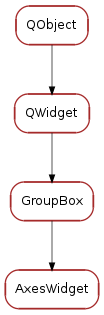
Inheritance diagram of AxesWidget

Classes

AxesWidget A multiple axis widget.
class qarbon.qt.gui.axeswidget.Axis(axis_info, axes, parent=None)[source]

Bases: PyQt4.QtCore.QObject

positionChanged = <PyQt4.QtCore.pyqtSignal object at 0x36d2ed0>
limitsChanged = <PyQt4.QtCore.pyqtSignal object at 0x36d2f10>
stepsChanged = <PyQt4.QtCore.pyqtSignal object at 0x36d2f50>
currentStepChanged = <PyQt4.QtCore.pyqtSignal object at 0x36d2f90>
stateChanged = <PyQt4.QtCore.pyqtSignal object at 0x36d2fd0>
labelChanged = <PyQt4.QtCore.pyqtSignal object at 0x36d5050>
unitChanged = <PyQt4.QtCore.pyqtSignal object at 0x36d5090>
axes[source]
refresh()[source]
getPosition(cache=True)[source]
setPosition(position, emit=True)[source]
position = <PyQt4.QtCore.pyqtProperty object at 0x36d5190>

This property contains the axis position

Access functions:

getLimits(cache=True)[source]
setLimits(limits, emit=True)[source]
limits = <PyQt4.QtCore.pyqtProperty object at 0x36d5250>

This property contains the axis limits

Access functions:

getState(cache=True)[source]
setState(state, emit=True)[source]
state = <PyQt4.QtCore.pyqtProperty object at 0x36d5310>

This property contains the axis state

Access functions:

getLabel()[source]
setLabel(label, emit=True)[source]
label = <PyQt4.QtCore.pyqtProperty object at 0x36d5390>

This property contains the axis label

Access functions:

getSteps()[source]
setSteps(steps, emit=True)[source]
steps = <PyQt4.QtCore.pyqtProperty object at 0x36d5410>

This property contains the axis steps

Access functions:

getCurrentStep()[source]
setCurrentStep(current_step, emit=True)[source]
currentStep = <PyQt4.QtCore.pyqtProperty object at 0x36d5490>

This property contains the axis current step size

Access functions:

getUnit()[source]
setUnit(unit, emit=True)[source]
unit = <PyQt4.QtCore.pyqtProperty object at 0x36d5510>

This property contains the axis unit

Access functions:

move(absolute_position)[source]
moveRelative(relative_position)[source]
moveUp()[source]
moveDown()[source]
stepUp()
stepDown()
stop()[source]
ToolTipTemplate = '<html>axis <u>{axis.label}</u> is in <b>{axis.state.name}</b> state, at position <b>{axis.position}</b><br/>\nLimits set to <b>[{axis.limits[0]}, {axis.limits[1]}]</b><br/>\n(the hardware name for this axis is: <i>{axis.name}</i>)'
toolTip()[source]
class qarbon.qt.gui.axeswidget.AxesWidget(title=None, axes=None, parent=None)[source]

Bases: qarbon.qt.gui.groupbox.GroupBox

A multiple axis widget.

DefaultUpdateStatusBar = True
axes()[source]
setAxes(axes)[source]
addAxis(axis)[source]
removeAxisID(axis_id)[source]
removeAxis(axis)[source]
getAxis(name)[source]
getAxisByRole(role)[source]
axisColumnWidget(axis, role)[source]
axisIDColumnWidget(name, role)[source]
setAxisColumnVisible(axis, role, show=True)[source]
setAxisIDColumnVisible(name, role, show=True)[source]
setColumnVisible(role, show=True)[source]
refreshAxes()[source]
onUserPositionApplied()[source]
onUserPositionChanged(value)[source]
onUserCurrentStepsChanged(index)[source]
onUserStepLeft()[source]
onUserStepRight()[source]
onUserStop()[source]
onAxisPositionChanged(name, position)[source]
onAxisStateChanged(name, old_state, state)[source]
onAxisLabelChanged(name, label)[source]
onAxisStepsChanged(name, steps)[source]
onAxisCurrentStepChanged(name, step)[source]

Steps changed from the Axis model:

  • change the current step value on the combo box
  • change the step size on the position spin box
  • update (enable/disable the stepLeft and stepRight buttons according to the current axis limits)
onAxisLimitsChanged(name, limits)[source]
onAxisUnitChanged(name, unit)[source]
setUpdateStatusBar(update)[source]
getUdpateStatusBar()[source]
resetUpdateStatusBar()[source]
classmethod getQtDesignerPluginInfo()[source]
updateStatusBar = <PyQt4.QtCore.pyqtProperty object at 0x36d56d0>

This property sets if the widget should update stauts bar with messages

Access functions: